How To Fix Windows Explorer Has Stopped Working ?
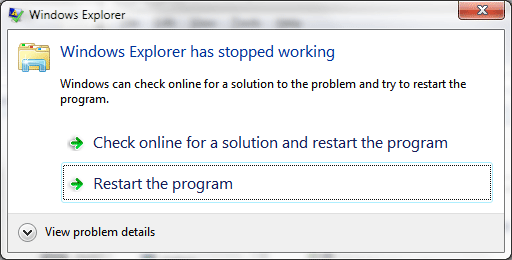
Questions:
- My computer starts showing Windows Explorer Has Stopped Working on every windows login ?
- Explorer or expoler.exe appcrash while working or on startup of computer?
- Need to start explore.exe by run command in task manager manually every time when Windows Explorer Has Stopped Working arrives on the computer screen?
These are those questions what I’m getting once in a week so i think to create a tutorial about this topic to help and understand you people better about this problem.
Actually Explorer.exe is program which your windows operating system starts automatically on every windows startup to use your computer in a normal way. If your windows explorer might bit in problem that means its 100% possible you’ve seeing this “Windows Explorer Has Stopped Working” app crash while working on your computer or maybe on system’s startup. Explorer is just a program like others and it’s also possible it gets corrupted and that’s normal because when a virus hits your computer the first thing it will do to corrupts your windows explorer file to make your computer abnormal. Sometimes it’s easy to fix this problem but sometimes it won’t so, let’s see how quickly you fix your problem by following our solution guide below.
Solution Guide
Note: Try to run your computer on safe mode if your computer is not able to opens up normally.
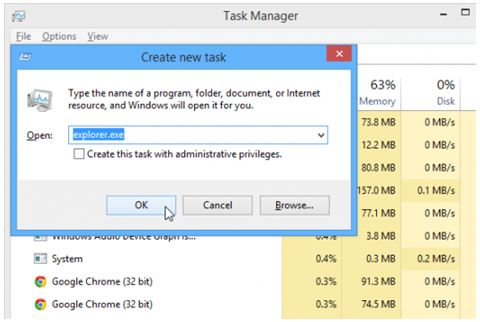
Note: Try to run your explorer by run command feature on task manager if your windows explore still won’t able to opens on safe mode either. To open task manager on blank screen you’ll need to press“Ctrl+Aly+Del” key at the same time and the menu screen will opens up in front of you and after that click on file at the first right top option on task manager.
File >> New Task (Run…) >> Type “explorer.exe” and hit enter.
Virus Scan & Registry Cleaning
Now you know this “Windows Explorer Has Stopped Working” problem is normally created by viruses and the best solution is to try is, install a good antivirus and do full system viruses scan and after that run windows registry cleaner software to repair and clean your windows registry from viruses. I’m only suggest these recommendation because viruses makes your windows registry infected and change it with the fake values in order to make your computer unable to use.
- Download and install a good antivirus and after that fully scan your computer. >>DOWNLOAD – Avast! Free Antivirus<<
- Download and install a good windows registry cleaner and after that scan and fix your computer’s registry. >>DOWNLOAD_CCleaner_Free_Registry_Cleaner_tool<
Drivers Update
Normally this problem comes with corrupted video drivers of your computer and reinstalling drivers is the only option you have if the problem is generating from a corrupted drivers.
Repair Your Windows
If the above solution wont works for you that mean your computers windows got corrupted and it needs to get repair. To repair your windows there are 3 things you can do to fix your computer and those are:
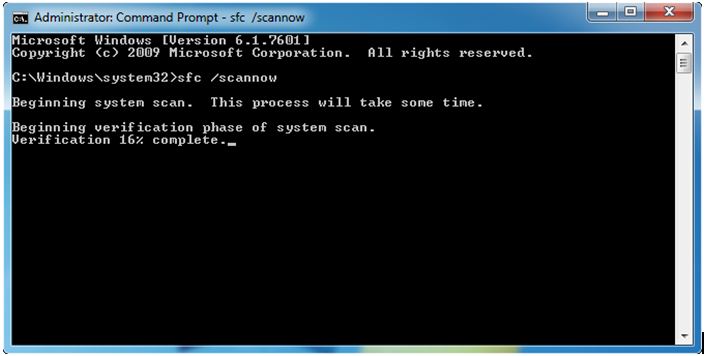
1. “Sfc /Scannow” Cmd Command – “Sfc /Scannow” is a system scan command to repair and fix your windows by command prompt automatically. It’s a best way to fix your windows by just typing single command on your computer and most of this problem got quickly fix by just using it. To use this command you’ll need to open your window command prompt ‘as an administrator’ and then type the “Sfc /Scannow” command on it like the picture shown below.
2. Manually Registry Repair – Most of times these above given solutions wont works because of windows bad corruption then the second option you have is to repair your windows registry by your own. Repairing registry for your explore is very easy you’ll just have to follow the instruction given below.
A. Press Windows key + R to open run command and after that type “Regedit” and hit enter to get into windows registry folder.
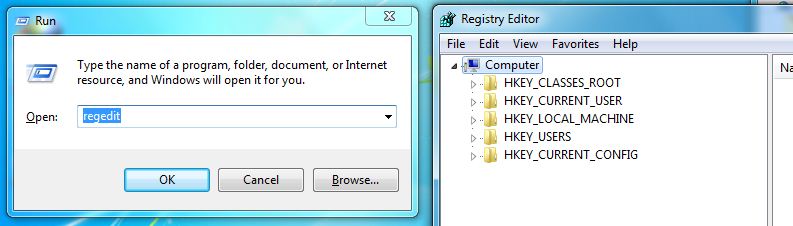
B. Now go to the given path on your windows registry editor by on folding registry folders “HKEY_CURRENT_USER\Software\Microsoft\Windows NT\CurrentVersion\Windows” and after that you will find your registry look like this:
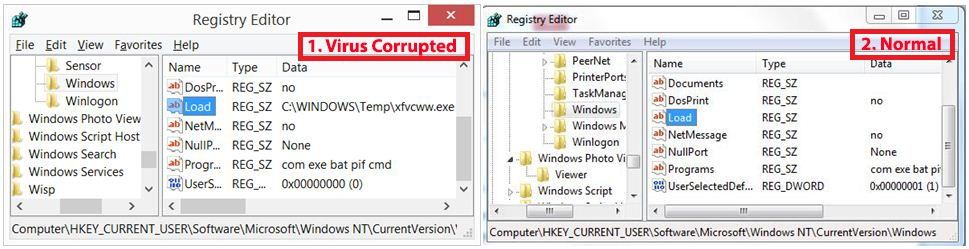
As you can see on listed picture above there are 2 types of possible “load” file you’ll find on your computer screen, one with virus corrupted and second one is normal which don’t have any data value on it. On my computer my “load” string file having a value data path to “xfvcww.exe” because of virus corruption and that means my windows is having problem with explorer. If your load file looks normal to you that means you have this load registry file problem just move to our next registry repair step No. “D:” below.
C. If you find your load file is corrupted then the best thing you can do to modify your registry and makes it normal as it was before. Just right click on your “Load” registry and after click on modify. After when the “edit string” windows pop out just edit the valve and make it blank and click ‘ok’ to save your file. After saving the file make a reboot (restart) your computer and test it. If the problem still exists move to our next step below.
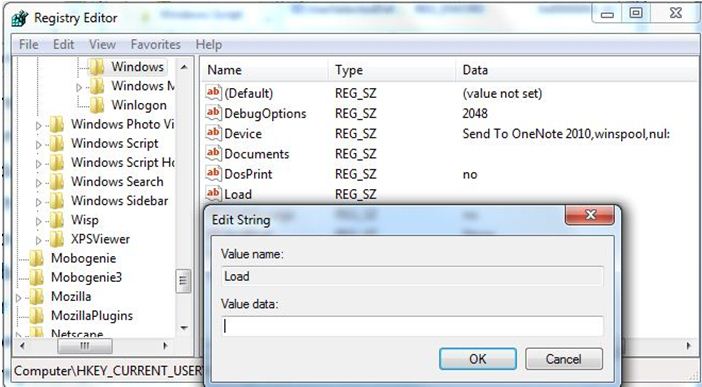
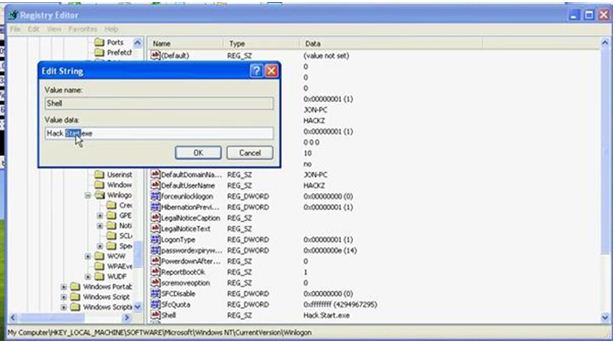
D. If the above registry repair wont works for you or maybe you didn’t find any corrupted load file then it’s possible you having a problem with another registry file. To identify you’ll need to go to this path and search for a registry named “shell”. Path “HKEY_CURRENT_USER\Software\Microsoft\Windows NT\CurrentVersion\Winlogon
If you find a registry named “shell” with some virus file path attached to it than its 100% possible this is a main root of your problem. In that case you can delete or edit the shell registry to blank and then restart your computer to make it normal as it was before. If you can’t find any file named shell that means your windows is fully corrupted and you can fix it by resorting or reinstallation of your computer windows.
Last Options
If you still having this Windows Explorer Has Stopped Working appcrash on your computer after trying all the solution given above in this tutorial then you have only two options left and those are”
- Restore your windows to the earlier stage and make it back to normal.
- Reinstall your windows and make everything back to new.
Enjoy...........NCTTS


