Showing posts with label WhatsApp. Show all posts

Whatsapp Going To Launch Video Calling This Month

Whatsapp Going To Launch Video Calling This Month

As we all know about the Whatsaap the most famous Free Messaging app of smartphone that is well known for sharing images,videos , text messages , location and much more. Its simple and user friendly interface makes it more attractive for user. As we allknow this app is now owned by facebook and after embedding the video calling feature in its messenger app noe facebook is working on Video Calling Feature in Whatsapp. News are coming about this latest feature of whatsapp and according to some of our web surfers this feature is upcoming in this month by soon. Recently Whastapp Launched Calling feature, Now WhatsApp may hurry up with the launch of the video calling feature.

Video Calling Feature in Whatsapp

Whatsapp Going To Launch Video Calling
Whatsapp Going To Launch Video Calling – Credit betanews.com

Video Calling Feature in Whatsapp

As we all are eagerly waiting for this feature and also this cool feature let us to make free video call with all our whatsapp contact and with a better quality and speed over it.
Recently media researchers have predicted that video calling feature of Whatsapp  will appear on this May. Ans also the pattern of launch of this feature will be same as of whatsapp calling feature. Android user will be luck one to receive this feature firstly than other plateform.
Also there was a news that whatsapp had already rolled out this feature for their employees for testing of this video calling feature.This feature may include mute or hold on the calls and all your voice calls will get converted into the video call.
Enjoy the tricks.........NCTTS

Whatsapp Tricks and Hacks 2015

Whatsapp Tricks and Hacks 2015

So these were Whatsapp tricks 2015, tips and hacks and I hope you liked them all. We will be coming up with more whatsapp tricks compilation in future. I am going to discuss about Latest and Best Whatsapp Hacks 2015. WhatsApp Messenger is a platform mobile messaging app which allows you to send and receive messages, photos, videos etc, and here are best tricks Whatsapp Tricks, Tips and Hacks 2015.

Whatsapp Tricks, Tips and Hacks 2015

Whatsapp Tricks, Tips and Hacks 2015

Here is Whatsapp Tricks, Tips and Hacks 2015 :-

#1 Use WhatsApp Without Your Mobile Number

If you don’t want to use your mobile no for your WhatsApp, whatever reason behind it. So this trick may help you to do that easily. Just follow the below steps and enjoy.
  1. If you are already using WhatsApp, uninstall it from your device completely. Download and install it again.
  2. Now when you open WhatsApp it’ll ask you to verify your phone number. It automatically sends a verification message to its server. Now the work/trick that you need to do/perform is blocking the message service and this can be easily done by keeping your phone on flight mode.
  3. It’ll ask you to choose an alternate method to verify. Choose ‘Verify through SMS’ and give your email address. Click on ‘Send’ and without waiting click on ‘Cancel’. This terminates the authorization process.
  4. Now you need to do is message spoofing.
    And after the spoofing of the message is done, you will receive messages intended for the spoofed number of your device, and then you can use your Whatsapp to communicate with people with your spoofed number.

Spoofing method

Go to your Outbox -> Copy the message details to spoofer app -> Send it to spoofed verification.
Use the following details.

#2 Whatsapp Free For Lifetime Hack

Requirements

  1. Apple Account
  2. Patience
  3. iPhone (temporary required)

Steps to Make Whatsapp Free For Lifetime

  1. First of all you need to download and install iTunes, It helps to easy create Apple Account. In this way you get apple account.
  2. Second Patience, it tradition on iOS where they give various free apps. So every year there period when whatsapp is completely free on iOS for example, lifetime subscription.
  3. Finally real trick is started now, you need a iPhone for this you can easily borrow from your friends. Now you can download WhatsApp from Apps store for free of cost with your account, now logout from his Apple account, install it on your friend’s iPhone with your sim card in it.
  4. After installing, you enter your required data and Done, Then, logout your WhatsApp Account. Take out of your sim card put it in your Android phone, download and install WhatsApp from your Apps Store like Play Store. Now go to your WhatsApp Settings > Account > Payment finally you found.

#3 Hacking your friend’s Whatsapp

I think this one is the amazing trick for anyone, because it sounds very less possibilities, But it is possible in a very easy way.
  1. Firstly, you need to do is, go to the MicroSD card and then click on the Whatsapp and later on on the Database option.
  2. After you are done with the first step you will find two files namely,
-mgstore-yyyy..dd..db.crypt
-msgstore.db.crypt

After finding these two files, you just need to do is take these files from your friends mobile and then you will be easily able to read their conversations that they have done with their friends. You can open them using a simple text editor.

#4 Recover Deleted Messages

WhatsApp by default stores all your conversations and activity on your SD card. Simply follow the previous trick in your WhatsApp.
  1. Simply go to: Micro SD card > WhatsApp > Databases and look for two files named
-msgstore-yyyy..dd..db.crypt
-msgstore.db.crypt

  1. The first file contains all the messages you have sent or received in the last seven days while the second file contains all messages sent or received on that day. You can retrieve those files easily. Now open them using a simple text editor.

#5 WhatsApp trick to Hide the sent image with other Image

Have you received an image where at first you see an image and when you click on the image you get to see a other one? There’s no trick but an app can do it. So you just install this app on your mobile device and enjoy!

#6 Change Your Friends’ Profile Picture

You can change your friend’s profile pic into your WhatsApp on your mobile only but not globally .
  1. Choose a funny profile picture for your friend.
  2. Resize the image to 561×561 pixels and name it with your friend’s mobile phone number.
  3. Save the image in SD card -> WhatsApp -> Profile Pictures.
  4. Overwrite an existing image if required.
  5. Disable WiFi and data network. If you don’t WhatsApp will automatically update the picture.
  6. Now show it to your friend who’ll surely shocked to see his changed image.

#7 Get Contacts Profile Pictures

If you want to save your friend’s profile pic in your mobile then there is no way to get it directly.
WhatsApp doesn’t provide an option to save the image. You can take a screenshot and then you’ll have to crop the unnecessary part. But after reading this trick you don’t need to do that just follow these steps.
  1. Go to in SD card > WhatsApp > Profile Pictures.
  2. The images will be associated to you friend’s mobile number and not his name. Just save it.

#8 Lock Your Whatsapp with Password

Yes, now you can password protect your whatsapp conversations this helps you to increase your security and also safety.
  • Download WhatsApp Lock
Enjoy..........NCTTS

WhatsApp Money To Your Friends Now

What if you run out of cash and need a fast and easy way to ask your friends for money? Here’s a good news for you. After the announcement of Facebook’s free money transfer feature via Messenger, now the social networking company has decided to bring a similar functionality to its instant messaging service WhatsApp.WhatsApp Money To Your Friends Now
Axis Bank, India’s third-largest private bank, has decided to bring the easiness of instant money transfer to your friends via applications like Facebook, WhatsApp, Twitter, or via email or SMS.
This is becoming possible with the help of Ping Pay service from the bank and is challenging its rivals HDFC Bank and ICICI Bank. Rajiv Anand, group executive, retail banking at Axis Bank said:
“This is the only application on which you can send and ask for money. The transfer of funds is instant while in other platforms there is a waiting period of 30 minutes to one day.”
This friend-to-friend money transfer takes place via the Immediate Payment Service (IMPS) of NPCI and currently Indian users can send up to Rs. 50,000 per day to their friends using this service.

How this Ping Pay service works for WhatsApp?

For sending the money, you will enter the amount and set a secret code which you will share with the receiver. Now after you will hit the “Send” button, the money will be transferred and instantly received by the receiver on WhatsApp or other platforms along with a message.

The receiver should transfer the money to his/her bank within 15 days and failing to do so, the money will be transferred back to you.
The companies these days are focusing on smartphones more than ever and this focus is well justified given the fact that to be competitive, the mobile businesses must be prioritized.
Are you going to try out this feature? Tell us in comments below!

Enjoy..........NCTTS

Use WhatsApp Without Registering Your Number

Use WhatsApp Without Registering Your NumberEverybody knows how whatsapp works! Registering your mobile number is the first step.In this post, I’ll tell you how can you use WhatsApp without using your mobile number, i.e. WhatsApp without using any number. Friends, you might be knowing that Facebook has launched web version of the WhatsApp currently for the chrome browser
which is becoming very popular day by day.
For messaging anyone without using any number, do the following steps:
     STEPS
  • Uninstall WhatsApp from your Android phone.
  • Download and install WhatsApp again.
  • Block all messaging services on your phone. Keeping your phone to flight mode will automatically block all messaging services.
  • Now open WhatsApp and Enter your number. In such case WhatsApp will accept numbers, but will not be able to send any verification message.
  • WhatsApp verification is not yet done, so users will not be able to use it.
  • Now WhatsApp wil ask you for alternate method of verification. Click on ‘Verify through SMS‘ option and provide your email address.
    Press Send button and within 2 second, press Cancel button. This will stop the authorization process.
  • Now another app Spoof Text Message will be needed to spoof the message.
  • This app will ask for some details. Use below details :
    • To: +447900347295
    • From: + (country code) ( mobile number)
    • Message: Your e-mail addressUse WhatsApp Without Registering Your Number
Now, your message will be sent from a spoof number and you can chat with your Friends with this spoofed number.
Keep Reading The Article.............NCTTS

How to Use WhatsApp on a PC


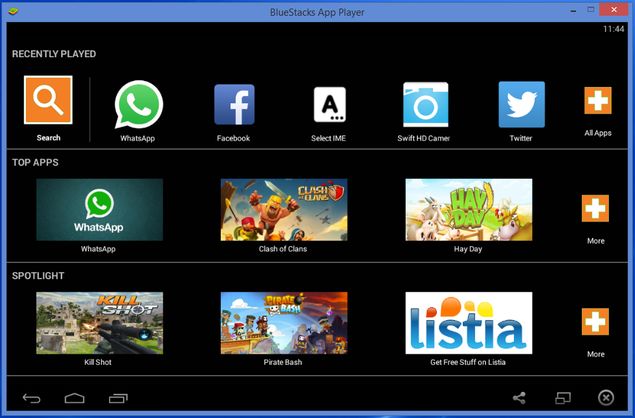
bluestacks_whatsapp.jpg


One of the limitations of WhatsApp is that you can only use it on your phone. If you are not carrying your phone, you're stuck without WhatsApp. Well, not anymore.
WhatsApp has rolled out WhatsApp Web that lets you use WhatsApp inside a desktop browser.  Here are instructions on how to setup WhatsApp Web. However, if you are unable to use WhatsApp Web for some reason, there's another way. Read on.

Note that while this guide is for WhatsApp, you can run almost any Android app using this method. Just replace the apk file in step 5, with the apk of the Android app you want to run. Here's a good source to download apk files.

1. You're going to need an Android emulator app to accomplish this. We've tried it withBluestacks App Player but it should work with any other emulator too. You'll also need a mobile phone to verify the WhatsApp account.
2. Download Bluestacks App Player on your computer.
3. Run the setup file to install it. During installation, Bluestacks will ask for App Store Access and App Notifications. You can uncheck both while installing.
4. Wait for the installation to finish (it takes several minutes). During the final stages of installation, Bluestacks will run in full-screen mode. Tap the diagonal line icon on the top-right to run it in windowed mode. This makes the next few steps easy.
5. Leave Bluestacks App Player running and go to your browser. Download theWhatsApp apk file.
6. Double-click the WhatsApp.apk file that's saved on your PC. The app will automatically install itself in Bluestacks App Player.
7. In Bluestacks, you'll see a grid of apps you've installed. Find and launch WhatsApp.
8. Enter your phone number and click Verify.
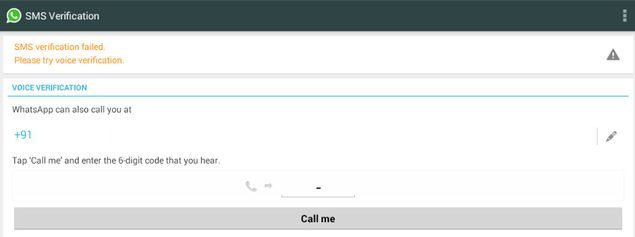
9. Now wait for 5 minutes as WhatsApp tries, and fails, to automatically verify using SMS.
10. After 5 minutes, WhatsApp will offer you an option for voice verification. Click Call me.
bluestacks_whatsapp_verification.jpg
11. You'll get a phone call. Answer it and you'll hear the verification code being spoken in loop.
12. Enter the verification in WhatsApp (running in Bluestacks) and you're good to go.
13. None of your existing contacts will show up in WhatsApp if you use this method. You can still reply to any messages you receive.
14. You can add contacts individually to WhatsApp by clicking on the three dots icon on the top-right > Contacts. Click the contact icon on the top-right, next to search. These contacts will be saved locally and will not show up on other devices. You can then start sending messages to these contacts as well.
15. Any groups you're a part of will also not show up on the PC. You will have to ask the group admin to add you to the group again.
If you're hoping to use WhatsApp on both your PC and your phone at the same time, you are out of luck. One phone number can be associated with only one device at a time - your phone will stop receiving WhatsApp messages when you're using it on the desktop. Another limitation is that you can't switch between the two devices instantly. WhatsApp imposes a 20-minute delay between two verification attempts (this delay keeps increasing with each verification attempt on the same day), so keep that in mind when setting it up on any device.
            You can also Install all Android Apps by following that same steps.
Enjoy The All Apps......................NCTTS